



Description
Product Description
A virtual machine (VM) is a software-based simulation of a computer environment that allows you to run an entire operating system and its programs inside a window on your current system. Think of it as a “computer within your computer”—completely isolated, yet fully functional.
Creating a virtual machine is straightforward: install virtualization software like VMware, and inside it, you’ll configure a virtual hard disk and operating system. This gives you the flexibility to run specialized software environments without altering or affecting your main operating system.
Virtual machines are ideal for engineers, developers, and learners who want to test, build, or use industrial automation tools safely and efficiently.
 Included in This Package
 Operating System:
- Windows 10 Pro – Fully Activated
 Virtualization Platform:
- VMware Workstation Pro
 Pre-installed Automation & Control Software:
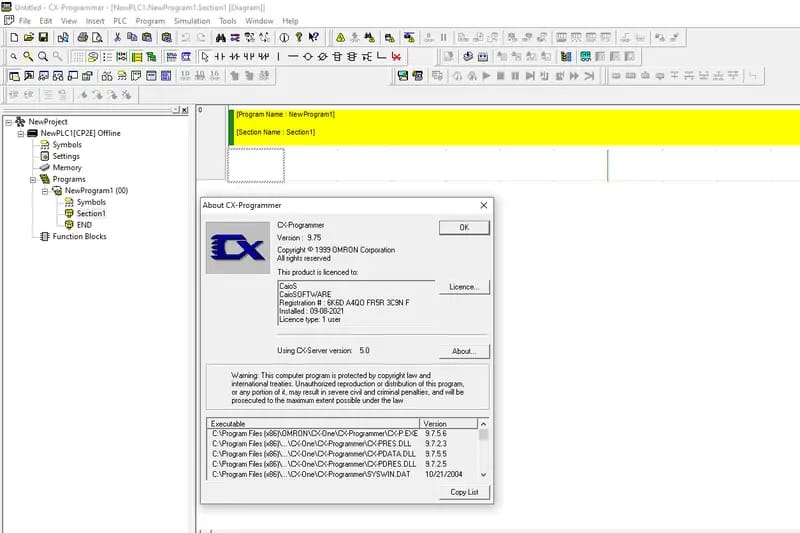
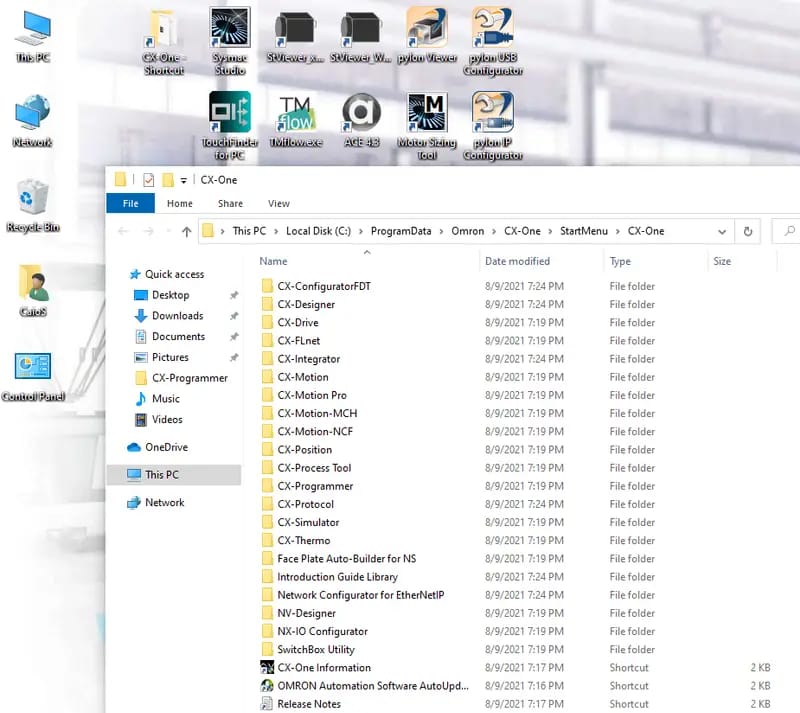
CX-One Suite V4.60:
- CX-Programmer
- CX-Designer
- CX-Drive
- CX-Thermo
- CX-Integrator
- CX-Protocol
- CX-Simulator
- CX-Motion (all modules: Pro, MCH, NCF)
- CX-ConfiguratorFDT
- CX-Position
- CX-FLnet
- CX-Process Tool
- NX-IO Configurator
- NV-Designer
- SwitchBox Utility
Additional Tools:
- CX-Supervisor Developer/Runtime V3.50
- CX-Server / Driver Management Tool V5.2
- Faceplate Auto-Builder for NS
- Motor Sizing Tool V1.50
- Sysmac Studio V1.52
- ACE (Automation Control Environment) V4.3.3.0
- TMflow V1.82
- FH/FHV Simulator V1.20
- Pylon Viewer V5.0
- StViewer V1.1.1
- TouchFinder FQ2 V2.20
All software is fully activated and ready to use, with no limitations.
 System Requirements
 Minimum Requirements (for basic usage):
- OS: Windows 7 / 8 / 10 (64-bit)
- CPU: 2.0 GHz dual-core
- RAM: 8 GB (4 GB for VMware + 4 GB for your system)
- Storage: 150 GB free HDD space
 Recommended Requirements (for best performance):
- OS: Windows 7 / 8 / 10 (64-bit)
- CPU: 2.5 GHz Quad-Core or higher
- RAM: 16 GB (10 GB for VMware + 6 GB for your system)
- Storage: 150 GB free SSD space
 Download & Setup
- Download Size: 47 GB (compressed)
- Extracted Size: 80 GB
- VMware Installer: Included
- Pre-configured: 4 GB RAM / 4 CPU Cores
(Settings adjustable in VMware according to your PC’s performance) - Tutorial Included: Step-by-step guide for installation & activation
All tools are fully installed, activated, and tested—no internet connection required for use.
 Contact Us to Purchase the Product
Ready to get started or have questions before you buy? We’re here to help!
Reach out to us anytime for pricing, installation assistance, or any other inquiries related to this virtual machine package.
📱 WhatsApp: +8618157347669
🌐 Live Chat: Whatsapp & Facebook
🕘 Support Hours: Monday to Saturday | 9 AM – 6 PM (GMT+6)


Top Search Keywords:
Omron Automation Software Package,
CX-Programmer software,
CX-Designer download,
CX-Drive module,
CX-Thermo software,
CX-Integrator full version,
CX-Protocol tools,
CX-Simulator download,
CX-Motion Pro module,
CX-Motion MCH module,
CX-Motion NCF module,
CX-ConfiguratorFDT software,
CX-Position tools,
CX-FLnet download,
CX-Process Tool software,
NX-IO Configurator module,
NV-Designer software,
SwitchBox Utility download,
Omron PLC software suite,
Best Omron automation tools
Reviews
There are no reviews yet.